How to Split Share Certificate?
Some company secretaries get confused between Splitting Shares and Splitting Share Certificate.
Splitting Share is considered as altering the Shares in Section 84 - Power of company to alter its share capital in the Companies Act 2016. However, the Act is silent on the share certificate splitting. Splitting the share certificate has no bearing on the shares allotted to the member.
To do the Share Certificate splitting, follow these simple steps;
-
Go to Entity > Shares > Share Certificate
-
Select one share certificate that you want to split. Tick the checkbox and click on the Manage Certificate button.
-
At the dropdown list, you should see Split Certificate. Click on that.
-
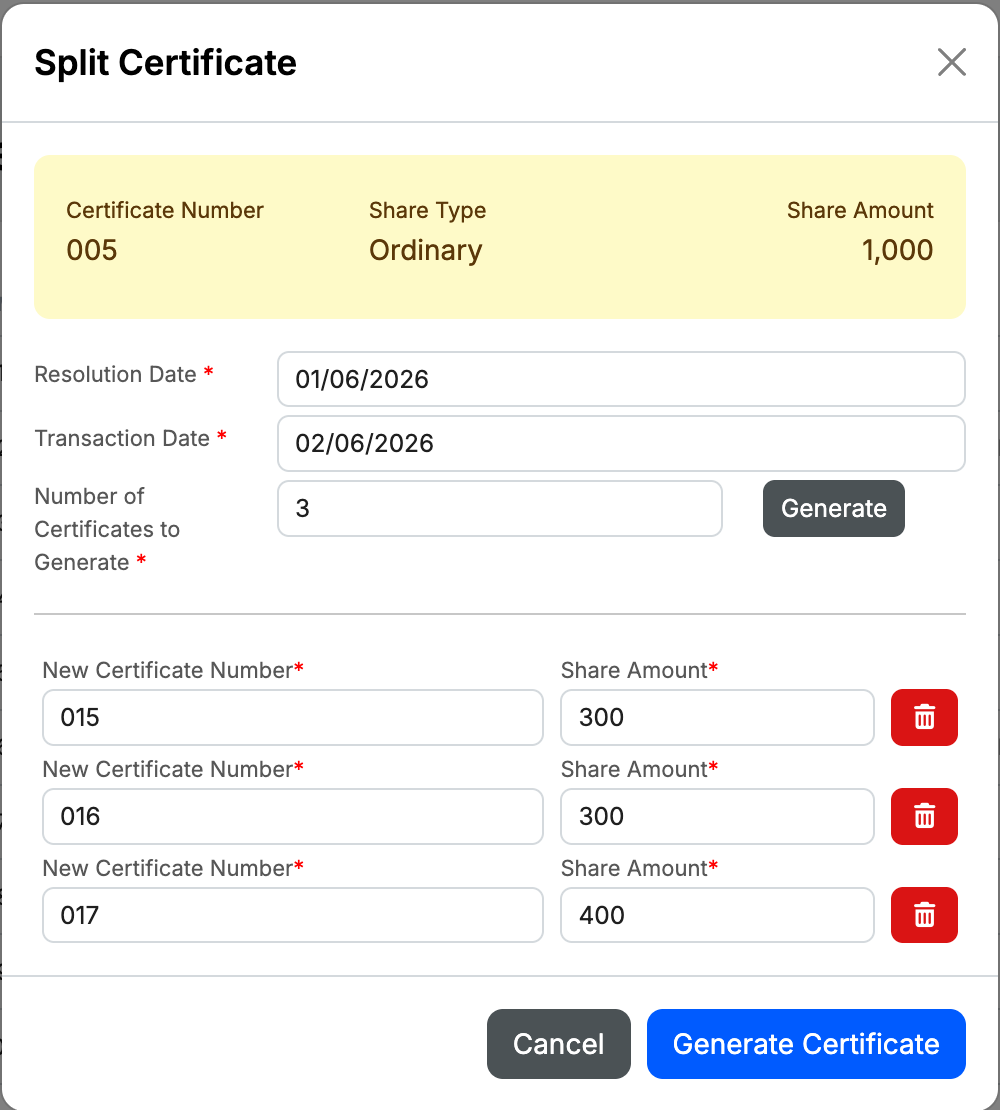
A pop up modal will appear.
-
Enter Resolution Date, the Transaction Date (of when the share certificate to be splitted) and Number of Share Certificate to be splitted. Click Generate to produce the New Certificate Number and Share Amount line item below.
-
Once you have entered all the relevant info at New Certificate Number and its Share Amount, click Generate Certificate to complete the process.
-
The original Share Certificate will be cancelled and new ones will be generated under the same Member's name.